CLASS 12-COMMERCE . ACCOUNTANCY . COMPUTERISED ACCOUNTING SYSTEM . USE OF-SPREADSHEET-IN-BUSINESS-APPLICATIONS
Chapter 3 : Use Of Spreadsheet In Business Applications
Ch 3
ACCOUNTANCY
CLASS 12-COMMERCE
Payroll Accounting
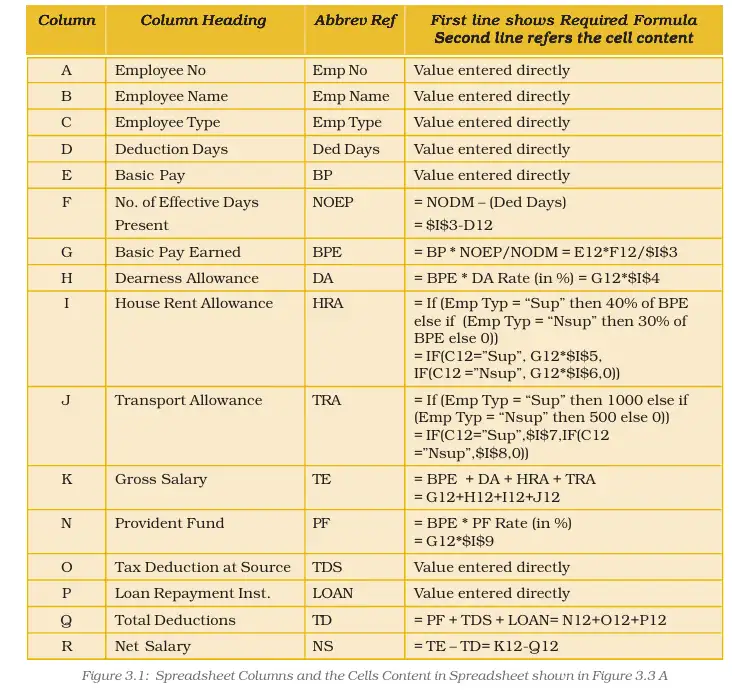
Payroll accounting involves the systematic computation and management of employee salaries within an organization. It includes calculating gross salary, making necessary deductions, and preparing payroll statements and salary slips. Payroll computations are based on factors such as attendance, basic pay, allowances, and statutory deductions.
Key Definitions / Features:
- Basic Pay (BP): The pay in the pay scale plus grade pay, excluding special pay.
- Grade Pay (GP): Additional pay based on employee designation and pay band.
- Dearness Pay (DP): Portion of Dearness Allowance merged with Basic Pay.
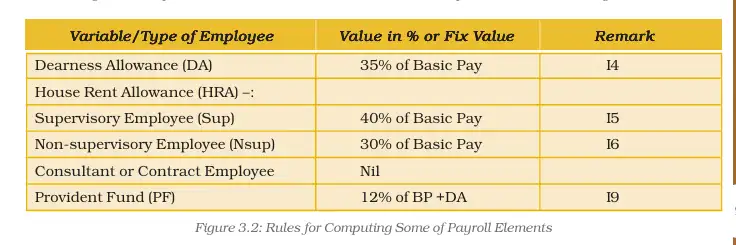
- Dearness Allowance (DA): Compensation for inflation, calculated as a percentage of (Basic Pay + Dearness Pay).
- House Rent Allowance (HRA): Amount paid to facilitate residential accommodation.
- Transport Allowance (TRA): Amount to facilitate commuting to the workplace.
- Deductions: Include Professional Tax, Provident Fund, Tax Deduction at Source (TDS), Loan Installments, and other statutory or organizational deductions.
Elements Used in Payroll Calculation:
- Basic Pay Earned (BPE): Calculated as BP multiplied by the ratio of Number of Effective Days Present (NOEDP) to Number of Days in Month (NODM).
- NOEDP: Number of days in a month minus leave without pay and unauthorized absence.
- Total Earnings (TE): Sum of BPE, DA, HRA, and TRA.
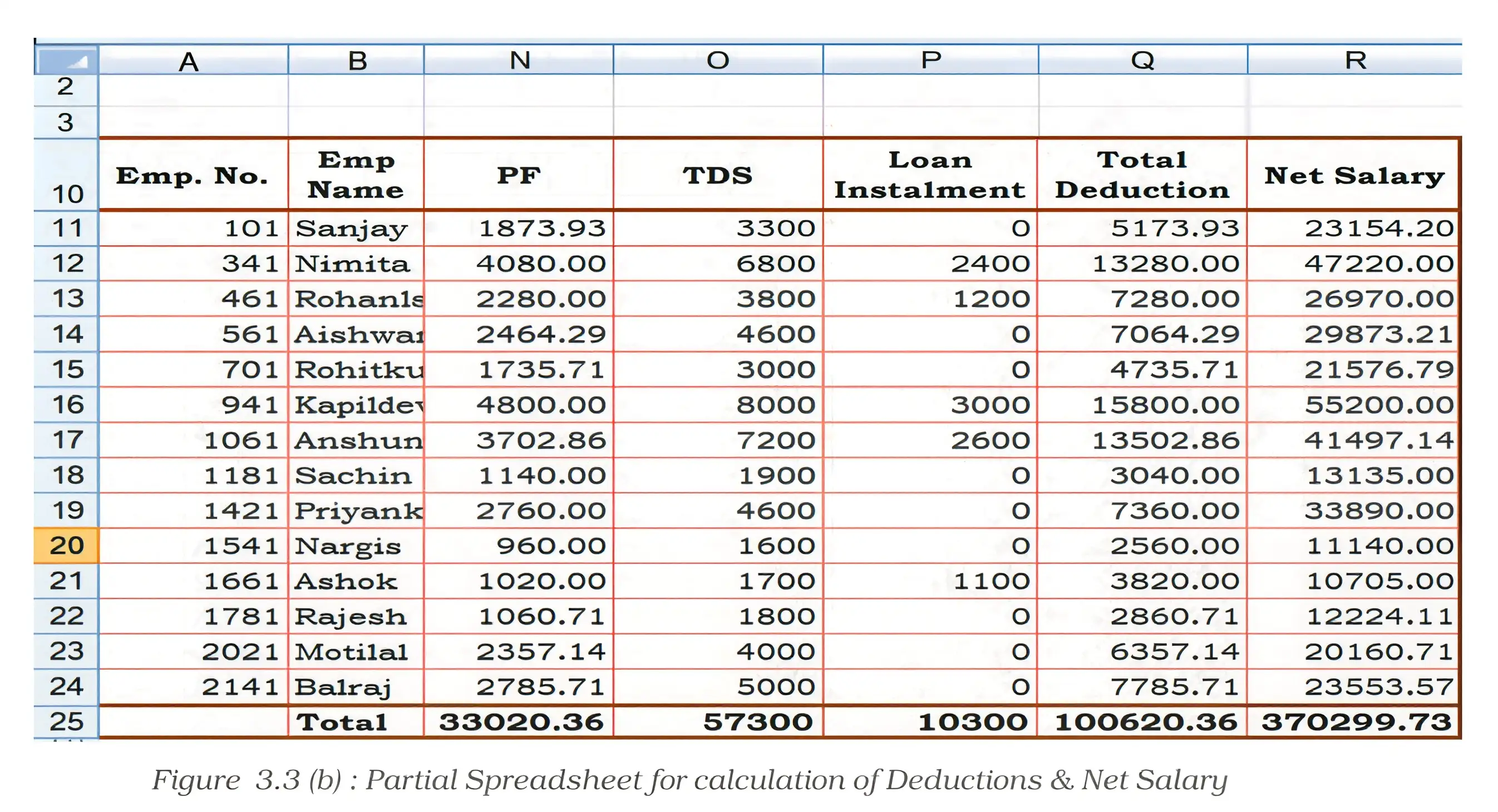
- Total Deductions (TD): Sum of PF, TDS, Loan recovery, and other deductions.
- Net Salary (NS): Total Earnings minus Total Deductions.
Illustrative Example:
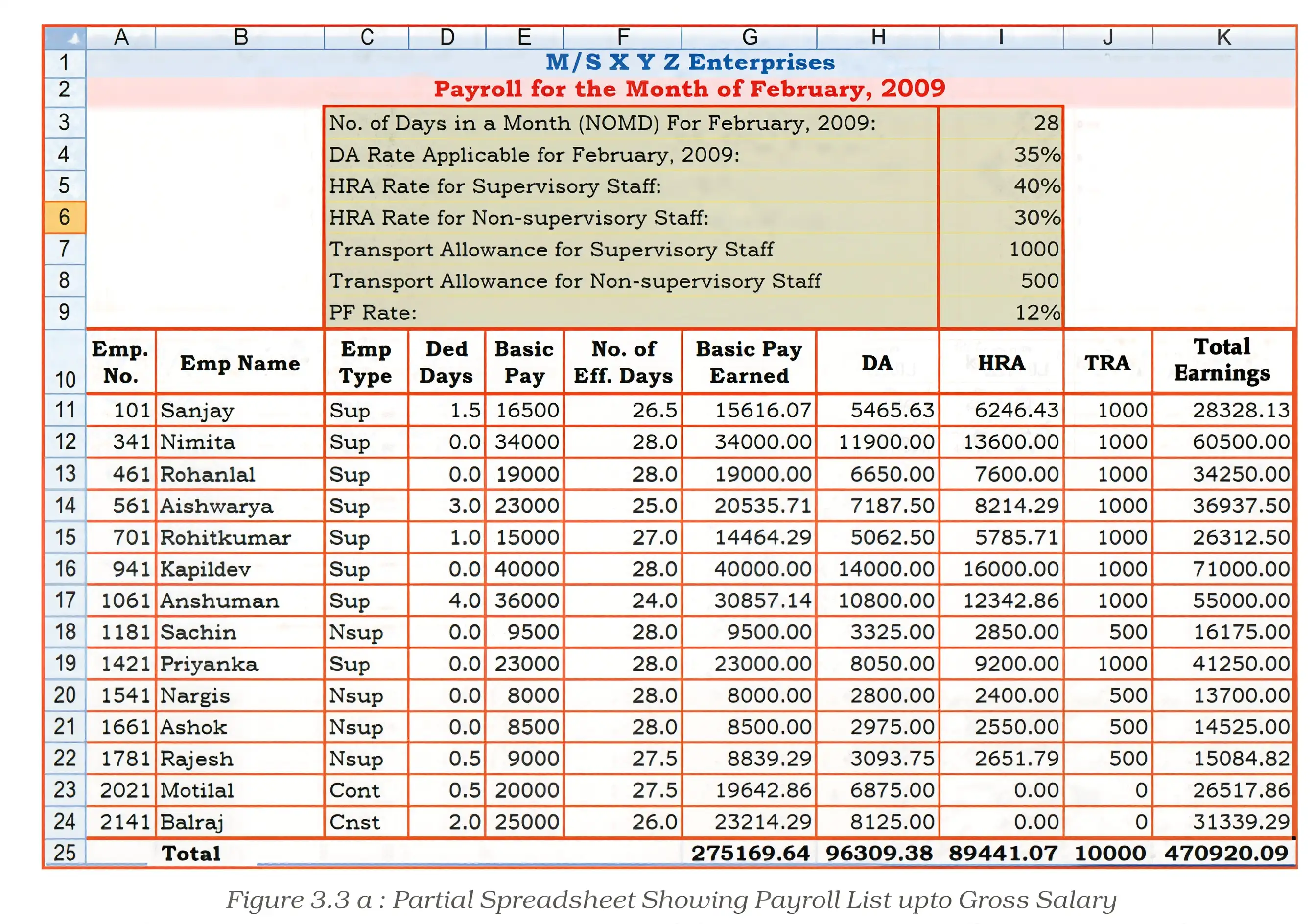
A payroll spreadsheet for 14 employees includes columns for employee details, attendance, pay components, deductions, and net salary. Formulas use absolute and nested IF functions to automate calculations based on employee type and attendance.
Practice Set:
- Level 1: Define key payroll components such as Basic Pay, DA, and PF.
- Level 2: Calculate net salary given attendance, pay rates, and deductions for an employee.
- Level 3: Design a payroll template for a small organization including formulas for earnings and deductions.
Answer Key:
Answers should include clear calculations of Basic Pay Earned, Total Earnings, Total Deductions, and Net Salary with formula references and explanations.
Quick Reference:
- Net Salary = Total Earnings - Total Deductions
- Total Earnings = BPE + DA + HRA + TRA
- BPE = BP × (NOEDP / NODM)
- TD = PF + TDS + Loan + Other Deductions
Glossary:
- Payroll: The total amount paid to employees.
- Gross Salary: Total earnings before deductions.
- Net Salary: Salary payable after deductions.
- Deduction: Amount subtracted from gross salary.
Asset Accounting
Asset accounting involves managing and calculating depreciation on fixed assets to reflect their consumption over time. It includes maintaining asset registers, computing depreciation, and preparing schedules for balance sheet reporting.
Key Definitions / Features:
- Fixed Assets: Long-term tangible and intangible resources like land, buildings, machinery, patents.
- Depreciation: Allocation of asset cost over its useful life to account for wear and tear.
- Acquisition Cost: Purchase price plus expenses like transportation and installation.
- Salvage Value: Estimated residual value at the end of asset life.
- Year-to-date Depreciation: Accumulated depreciation from asset use start to current year.
Methods of Depreciation:
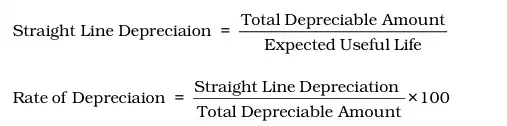
Straight Line Method (SLM)
Depreciation is charged evenly over the asset's useful life.
- Formula:
Straight Line Depreciation = \( \frac{\text{Acquisition Cost} - \text{Salvage Value}}{\text{Useful Life}} \) - Rate of Depreciation = \( \frac{\text{Straight Line Depreciation}}{\text{Acquisition Cost} - \text{Salvage Value}} \times 100 \)%
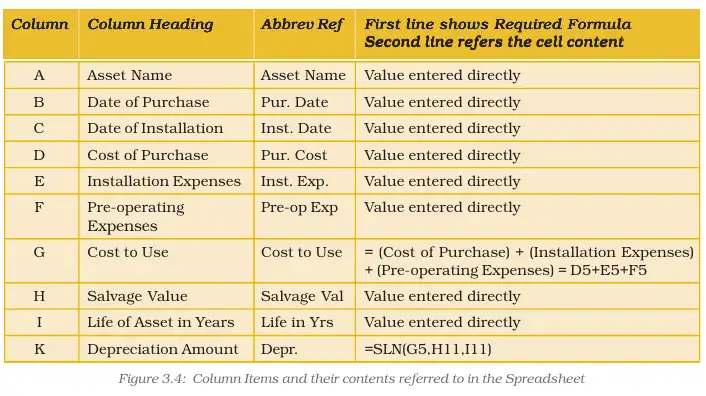
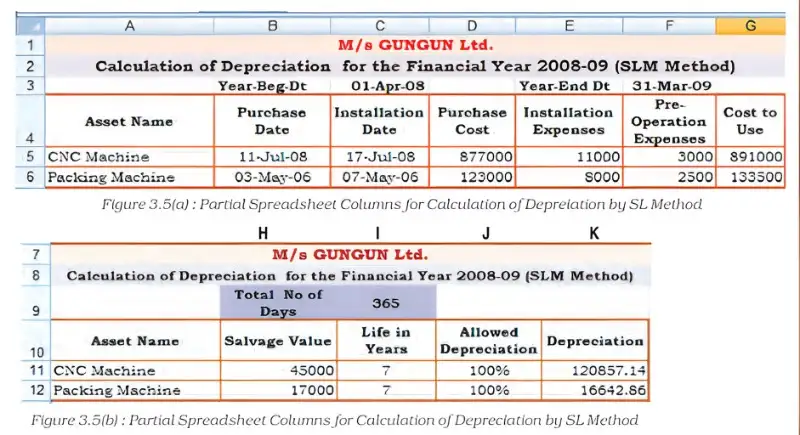
Example: Depreciation calculation using Excel's SLN function with asset cost, salvage value, and life span.
Written Down Value (WDV) Method
Depreciation is charged on the reducing book value of the asset each year, also called Declining Balance Method.
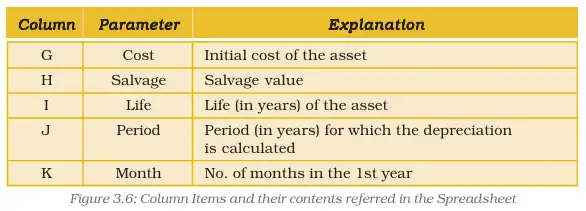
- Excel's DB function is used with parameters: cost, salvage value, life, period, and months in first year.
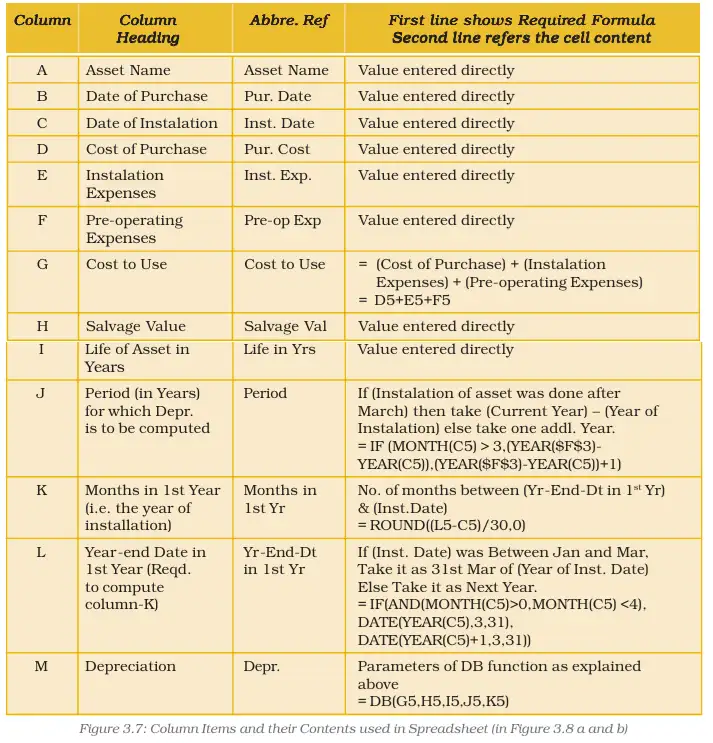
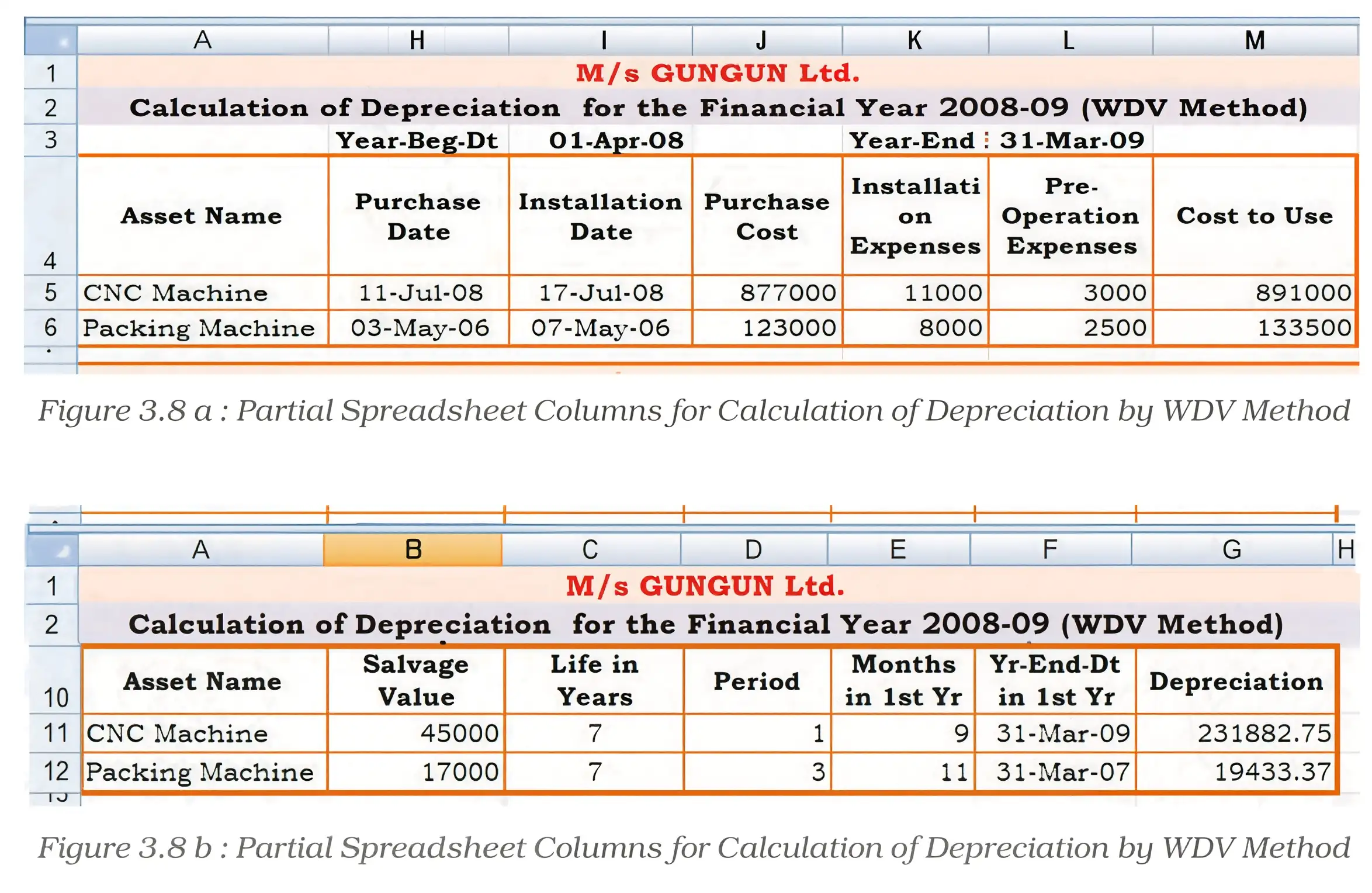
Schedule Forming Part of the Balance Sheet:
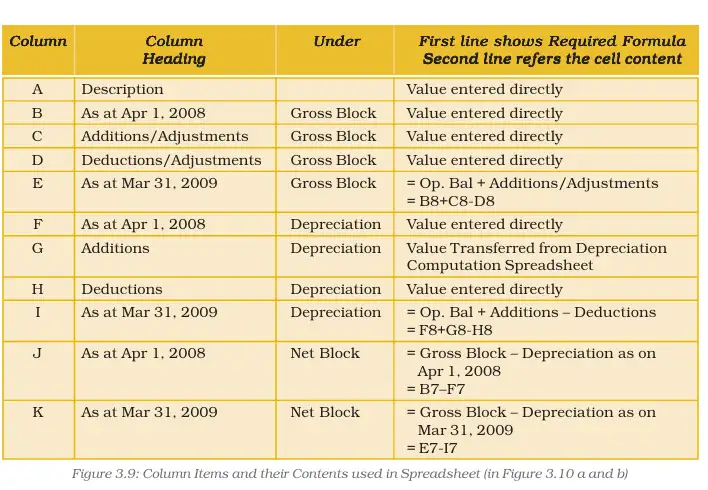
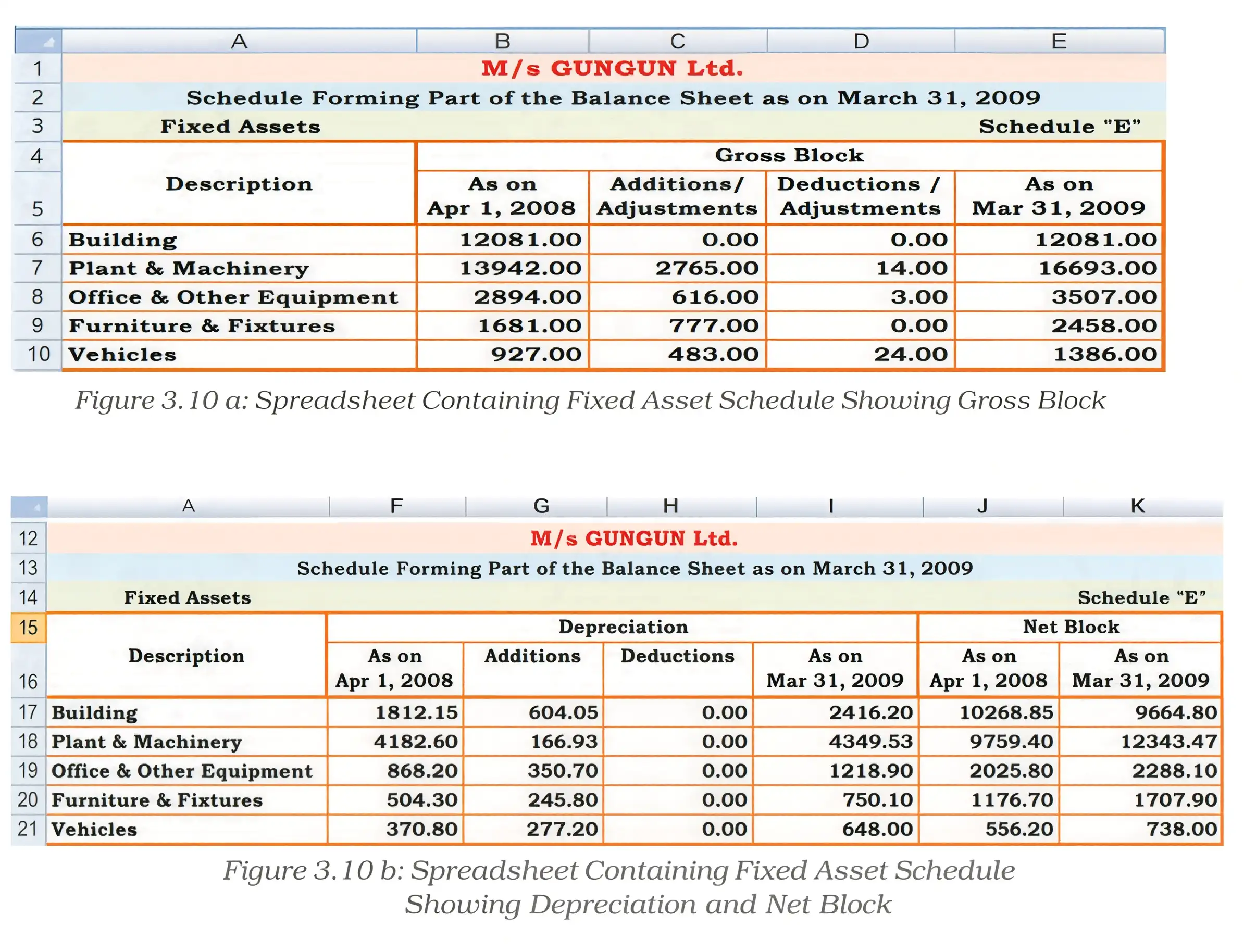
Assets and depreciation details are organized in schedules showing gross block, additions, deductions, depreciation, and net block values for reporting.
Practice Set:
- Level 1: Define fixed assets and explain the need for depreciation.
- Level 2: Calculate depreciation using SLM and WDV methods for given asset data.
- Level 3: Prepare a depreciation schedule for multiple assets using spreadsheet formulas.
Answer Key:
Answers should include stepwise depreciation calculations, formula usage, and preparation of asset schedules with clear presentation.
Quick Reference:
- SLM Depreciation = \( \frac{\text{Acquisition Cost} - \text{Salvage Value}}{\text{Useful Life}} \)
- WDV Depreciation calculated on reducing balance using DB function.
- Net Block = Gross Block - Accumulated Depreciation
Glossary:
- Asset Register: Record of all fixed assets owned by the organization.
- Gross Block: Total cost of assets before depreciation.
- Net Block: Asset value after deducting accumulated depreciation.
- Salvage Value: Residual value at asset life end.
Loan Repayment Schedule
Loan repayment involves calculating periodic instalments to repay borrowed money (principal) with interest over a specified period. Spreadsheets can automate these calculations using built-in financial functions.
Key Definitions / Features:
- Principal: The original amount borrowed.
- Interest Rate: The cost of borrowing expressed as a percentage.
- Loan Period: Duration over which the loan is repaid.
- Instalments: Periodic payments made to repay the loan.
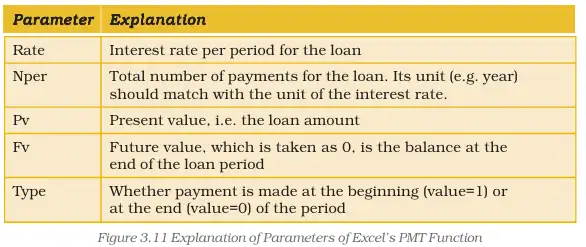
- PMT Function: Excel function to calculate payment amount for a loan based on rate, number of periods, present value, future value, and payment timing.
PMT Function Parameters:
- Rate: Interest rate per period.
- Nper: Total number of payment periods.
- Pv: Present value or loan amount.
- Fv: Future value, usually zero (loan fully repaid).
- Type: Payment timing (0 = end of period, 1 = beginning).
Illustrative Examples:
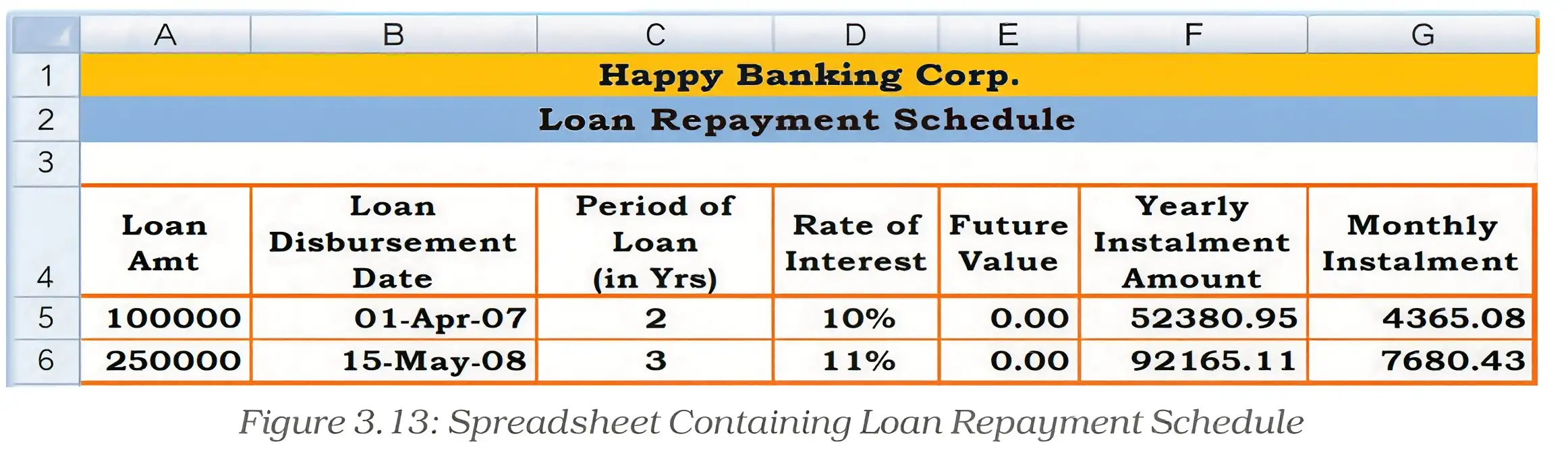
1. Loan of Rs. 1,00,000 at 10% interest for 2 years, repaid in 24 monthly instalments.
2. Loan of Rs. 2,50,000 at 11% interest for 3 years, repaid in 36 monthly instalments.
Practice Set:
- Level 1: Define loan-related terms such as principal, interest rate, and instalment.
- Level 2: Calculate monthly instalment for a given loan using PMT function.
- Level 3: Prepare a loan repayment schedule for a multi-year loan with varying interest rates.
Answer Key:
Answers should include detailed calculations using PMT function parameters, stepwise instalment computations, and clear presentation of repayment schedules.
Quick Reference:
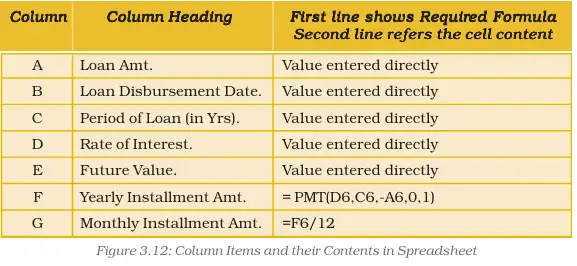
- Loan Instalment = PMT(rate, nper, -pv, fv, type)
- Future Value (FV) = 0 for fully repaid loans
Glossary:
- Principal: Original loan amount.
- Interest Rate: Percentage cost of borrowing.
- Instalment: Periodic loan repayment amount.
- PMT Function: Excel function to calculate loan payments.